How to Make an Invoice Without a Company (Step-by-Step Guide for Freelancers & Individuals)
Let’s clear this up first, you do not need a registered company to send an invoice.
A lot of beginners hesitate at this stage. Maybe you’ve just completed your first freelance project, helped someone with a small service, or started earning online — and now you’re thinking:
👉 “Can I even send an invoice without a business?”
Short answer: Yes, you absolutely can.
In fact, thousands of freelancers, independent contractors, and individuals send invoices every day without having a registered company.
The key is knowing what to include, how to present it professionally, and how to make sure your invoice still looks trustworthy.
Can You Legally Send an Invoice Without a Company?
Yes — in most cases, you can send an invoice using your personal name instead of a registered business name.
An invoice is simply a document requesting payment for goods or services. It doesn’t require you to have a registered company unless local laws specifically demand it for taxation purposes.
For example, if you’re a freelance writer, designer, developer, or even someone doing one-time work, you can invoice clients using your own name and contact details.
👉 The important part is clarity, not registration.
As long as your invoice clearly identifies:
who provided the service
who the client is
what was delivered
how much is owed
…it is considered valid in most situations.
What to Put on an Invoice Without a Business Name
This is where most people get confused.
You don’t have a company — so what do you actually write?
Here’s the simple structure.
Instead of a business name, you use:
👉 Your personal name (as the service provider)
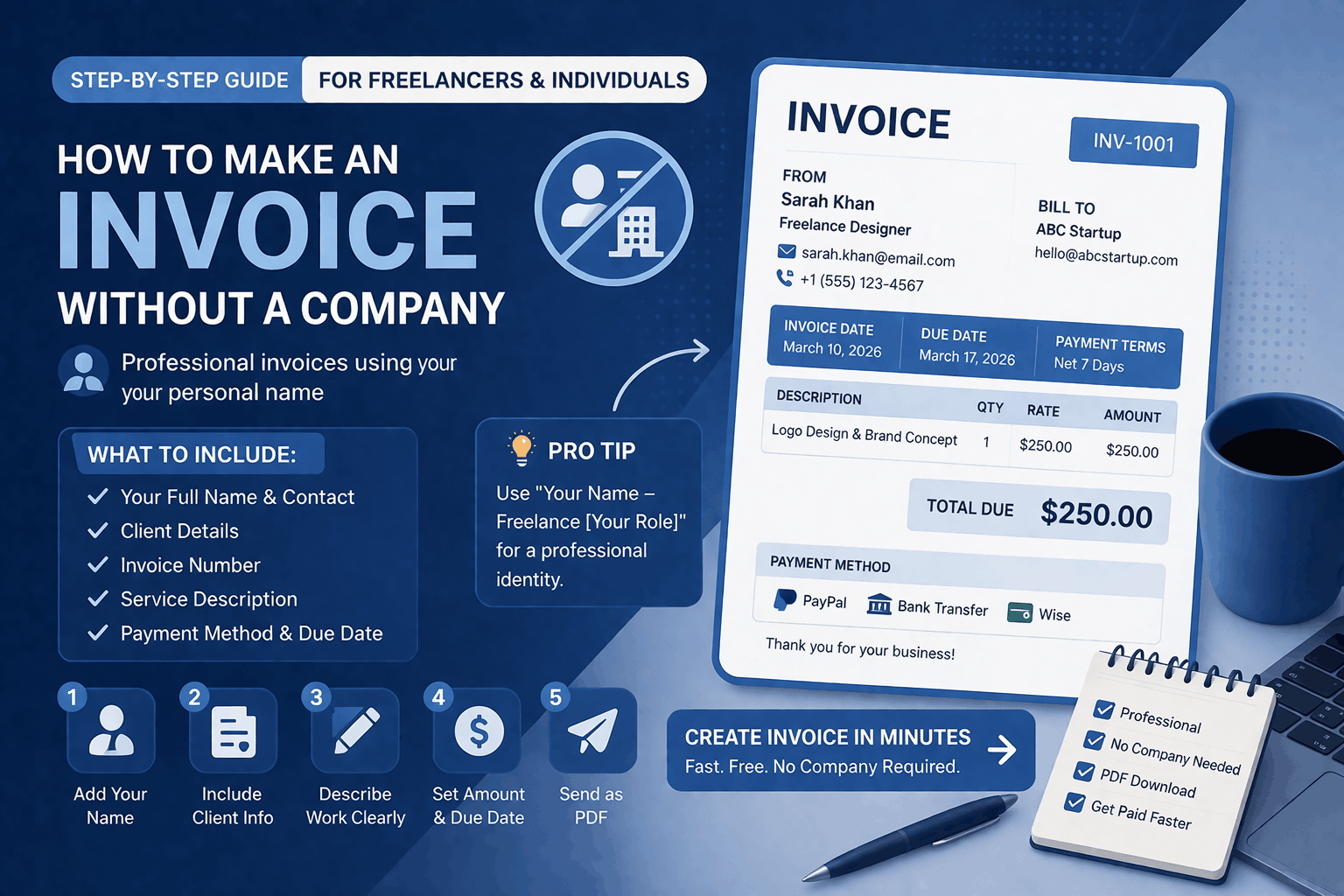
Your invoice should include:
Your full name
Your contact details (email, phone if needed)
Client name and details
Invoice number
Invoice date and due date
Description of services
Total amount
Payment method
Pro Tip
If you want to look more professional without registering a company, you can use a simple format like:
“John Smith – Freelance Graphic Designer”
This gives you a professional identity without needing a business registration.
Step-by-Step: How to Make an Invoice Without a Company
Let’s walk through this in a practical way.
Step 1: Use Your Name as the Business Identity
Start by adding your full name at the top of the invoice.
You can optionally add:
your role (freelancer, consultant, etc.)
your contact details
This helps your client clearly identify who they are paying.
Step 2: Add Client Information
Include your client’s name and, if needed, their company or address.
This is important for:
record keeping
professionalism
avoiding confusion
Step 3: Describe the Work Clearly
This is where many beginners make mistakes.
Avoid vague descriptions like:
“Work done”
“Service provided”
Instead, be specific.
For example:
“Logo design for brand identity project”
“Website development (5 pages)”
“Content writing – 3 blog articles”
👉 Clear descriptions = fewer questions + faster payments
Step 4: Add Pricing and Total Amount
List your charges clearly.
You can charge:
per project
per hour
per item
Make sure the total amount is easy to see.
Step 5: Include Payment Details
Tell your client how to pay you.
This can include:
bank transfer
PayPal
Stripe
any other method you use
Without this, clients may delay payment simply because they don’t know what to do next.
Step 6: Generate and Send the Invoice
Once everything is ready, export your invoice as a PDF and send it via email.
👉 Using an invoice generator makes this process much easier
You don’t have to worry about formatting, calculations, or layout.
Real Example: Invoice Without a Company
Let’s make this real.
Imagine you’re a freelance designer who created a logo for a client.
Your invoice might look like:
Name: Sarah Khan
Role: Freelance Designer
Client: ABC Startup
Description: Logo design and brand concept
Amount: $250
Payment Method: PayPal
Due Date: 7 days
Even without a registered business, this invoice is:
✔ clear
✔ professional
✔ complete
And that’s what matters.
Common Mistakes to Avoid
When creating invoices without a company, a few small mistakes can make you look unprofessional.
One common issue is leaving out important details like invoice numbers or due dates. This makes tracking payments harder.
Another mistake is inconsistent formatting. If your invoice looks messy, it can affect how seriously clients take it.
Some people also forget to include payment instructions, which creates unnecessary delays.
👉 The goal is simple: make it easy for your client to pay you.
Do You Need a Business Name for Freelance Invoices?
Not necessarily.
Many freelancers operate under their personal name, especially in the early stages.
However, as your work grows, you might consider:
creating a brand name
registering a business
adding a logo
This is not required — it’s just a step toward scaling.
How to Look Professional Without a Company
This is where most beginners worry.
But professionalism doesn’t come from having a company — it comes from presentation.
Here’s what actually matters:
clean invoice design
clear structure
proper language
consistent formatting
👉 Clients care about clarity and reliability more than your business status.
Note from Experience
Many clients won’t even ask if you have a company.
They care about:
your work
your communication
your reliability
Your invoice is just a reflection of that.
When Should You Upgrade to a Business?
You don’t need a company to start — but at some point, it may make sense.
Consider registering a business when:
you have regular clients
your income is growing
you need tax benefits
you want to build a brand
Until then, invoicing as an individual is completely normal.
Invoice vs Receipt (Important for Beginners)
If you’re new, this is important to understand.
Invoice = request for payment
Receipt = proof of payment
You send an invoice first.
After payment is completed, you send a receipt.
If you want to create a clean and professional invoice without worrying about formatting, you can use a simple invoice generator.
It lets you create, download, and send invoices in minutes — even if you don’t have a company.
Frequently Asked Questions
Can I create an invoice without a business name?
Yes, you can create an invoice using your personal name instead of a business name. As long as the invoice includes clear details about the service, client, and payment, it is considered valid in most cases.
Is it legal to send invoices as an individual?
In most countries, individuals can send invoices without registering a company, especially for freelance or small-scale work. However, it’s always a good idea to check local tax regulations if your income grows.
What should I put instead of a company name on an invoice?
You can use your full name along with a short professional title, such as “Freelance Designer” or “Independent Consultant.” This helps present your invoice in a more professional way.
How do I make my invoice look professional?
Use a clean format, clear descriptions, and consistent structure. Adding a simple title, proper spacing, and a PDF format can make a big difference in how your invoice is perceived.
Do freelancers need to register a business to send invoices?
No, freelancers can send invoices without registering a business. Many freelancers operate under their personal name, especially when starting out.
What is the easiest way to create an invoice without a company?
The easiest way is to use an online invoice generator. It allows you to create professional invoices quickly without worrying about formatting or calculations.