How to Invoice US Clients as a Freelancer (2026 Guide + Real Example)
To invoice US clients as a freelancer (especially from outside the US), use a structured PDF invoice with a unique invoice number, USD currency, and clear payment terms like Net 15. Non-US freelancers must submit Form W-8BEN to avoid up to 30% tax withholding. Matching your legal name across invoice, tax form, and payment account is critical to prevent delays.
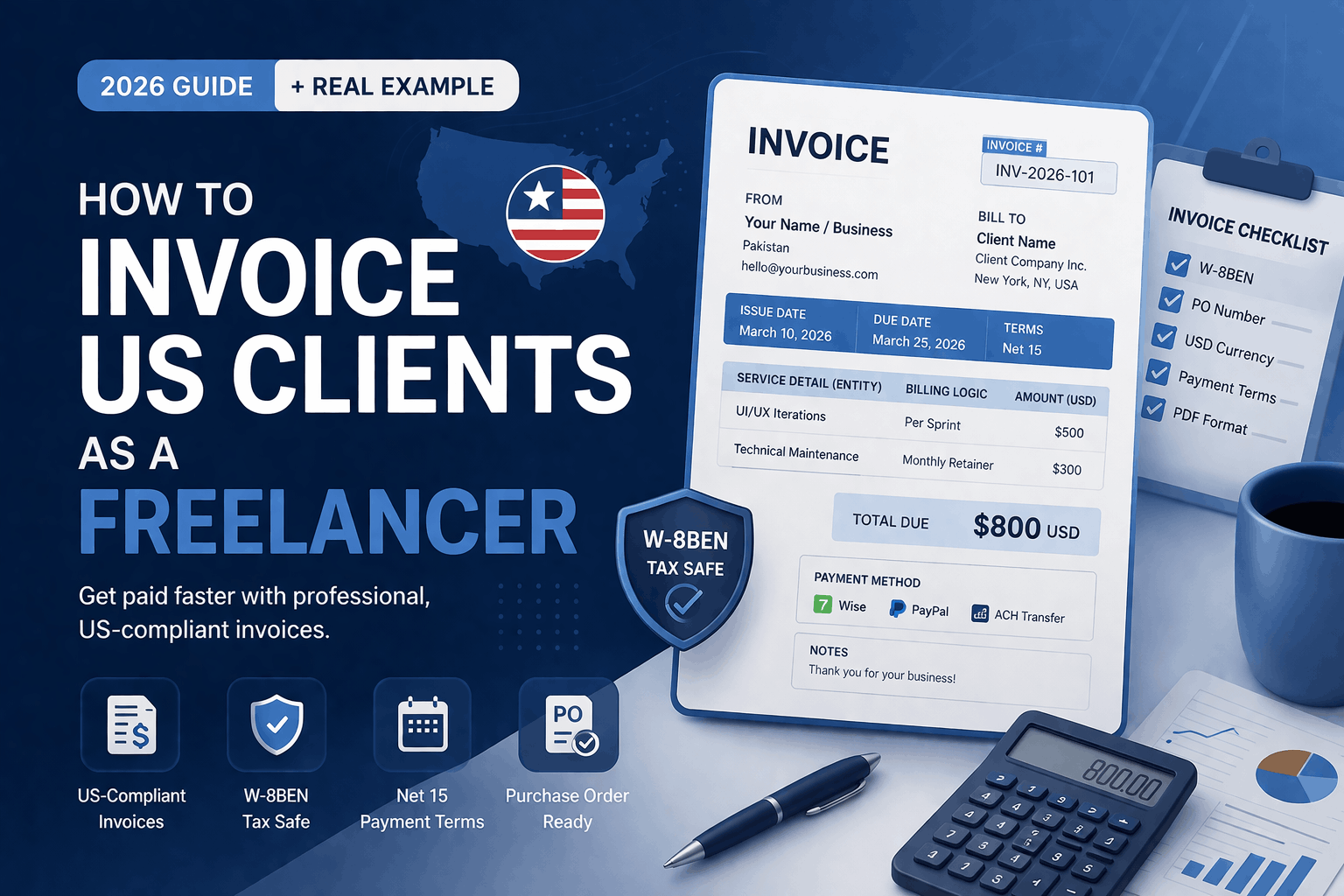
Copy This: 2026 US Freelancer Invoice Template
Use this format to ensure your invoice is accepted by modern accounting systems.
Invoice Details
- Invoice ID: INV-2026-101
- Issue Date: March 10, 2026
- Due Date: March 25, 2026 (Net 15)
From (Service Provider)
- Your Legal Name / Business Entity
- Country (e.g., Pakistan)
- Email Address
Bill To (Client)
- Client Name
- Company Name (Legal Entity)
- US Address
Service Details (Structured Billing)
| Service Detail (Entity) | Billing Logic | Amount (USD) |
|---|---|---|
| UI/UX Iterations | Per Sprint | 500 |
| Technical Maintenance | Monthly Retainer | 300 |
Total Due: $800 USD
Tax: 0% (Exported Service)
Payment Information
- Method: Wise / PayPal / ACH Transfer
- Terms: Net 15
- Late Fee: 5% after due date
👉 Instead of creating this manually every time, you can generate a structured, ready-to-send invoice using our professional invoice generator and avoid formatting errors.
🌍 The W-8BEN Requirement (Avoid 30% Tax Withholding)
What is Form W-8BEN?
Form W-8BEN is a document required by the Internal Revenue Service for non-US freelancers.
👉 Without it:
US companies are legally required to withhold up to 30% of your payment.
⚠️ The “Identity Match” Rule
To ensure smooth payment processing, these must match exactly:
- Name on your W-8BEN
- Name on your invoice
- Name on your payment account (Wise / bank)
Why this matters:
Mismatch leads to:
- Payment delays
- Compliance checks
- Higher Days Sales Outstanding (DSO)
✅ Best Practice
Send your W-8BEN:
- Before your first invoice
- Or at the start of each fiscal year
💰 Why “Net 15” Works Better Than “Due on Receipt”
Most freelancers choose payment terms randomly. That’s a mistake.
🧠 How US Accounting Actually Works
- Payments are processed in cycles (often weekly)
- Approval involves multiple steps (manager → finance → release)
✅ Net 15 Strategy
- Gives two processing cycles
- Reduces approval friction
- Fits standard accounts payable workflows
Comparison:
| Term | Result |
|---|---|
| Due on Receipt | Often ignored or delayed |
| Net 15 | Balanced + faster processing |
| Net 30 | Slower cash flow |
Pro Tip:
Add this line in your invoice:
“Late fee of 5% applies after due date.”
This increases payment priority.
🔄 Purchase Orders (PO): Why Your Invoice Might Get Rejected
What is a PO Number?
A Purchase Order (PO) is issued by the client before work begins.
It acts as:
- Budget approval
- Internal tracking ID
⚠️ Critical Rule
If a PO number is provided:
👉 You MUST include it in your invoice
Where to place it:
At the top:
PO Number: 45821
Why this matters:
Most companies use automated systems.
Without PO:
- Invoice gets rejected
- Payment is blocked
- No reconciliation match
🧠 Key Concept: Three-Way Matching
To release payment, systems match:
- Purchase Order
- Invoice
- Delivery / Service record
No match = No payment
⚠️ Common Invoice Mistakes That Increase Payment Delays
To reduce payment friction, avoid these:
❌ Missing Currency
Always write:
USD ($)
❌ Vague Descriptions
Bad:
Freelance work
Good:
Landing page UI design (3 revisions)
❌ No Payment Method
Always specify:
- Wise / PayPal / Bank
❌ No Invoice Number
Breaks audit tracking
❌ Sending Non-PDF Format
Use:
👉 Clean PDF only
🚀 Why Use an Online Invoice Generator?
Manual invoices (Word/Excel) often cause:
- Formatting errors
- Calculation mistakes
- Rejection by accounting systems
A structured tool helps you:
- Create machine-readable invoices
- Ensure compliance with US standards
- Maintain clean audit records
- Generate PDFs instantly
👉 You can create your invoice now using our free invoice generator and send a professional invoice in minutes.
✔ Final Checklist Before Sending
- Invoice number added
- USD currency specified
- W-8BEN submitted
- PO number included (if required)
- Payment terms clearly defined
- Services properly described
- PDF format used
🧠 Final Thoughts
Invoicing US clients is not complicated—but it is structured.
If you:
- Align with their accounting systems
- Reduce friction in your invoice
- Follow compliance basics
👉 You get paid faster and more consistently.
👤 About the Author
Written by a freelancer experienced in working with international clients, focusing on simplifying cross-border invoicing, payment systems, and compliance workflows.